# 变量
# 变量的使用
# 声明变量
- var 是一个 JS 关键字,用来声明变量 (variable—— 变量的意思), 使用该关键字声明变量后,计算机会自动为变量分配内存空间,不需要程序员管
- age 是程序员定义的变量名,我们要通过变量名来访问内存中分配的空间
# 变量赋值
# 变量小测试
1
2
3
4
5
6
7
8
9
10
11
12
13
| <!DOCTYPE html>
<html lang="en">
<head>
<meta charset="UTF-8">
<title>变量</title>
<script>
var name = prompt("请输入用户姓名:");
console.log(name);
</script>
</head>
<body>
</body>
</html>
|
# 数据类型
JS 把数据类型分为两类 :
- 简单数据类型 (Number, String, Boolean, Undefined, Null)
- 复杂数据类型 (object)
| 简单数据类型 | 说明 | 默认值 |
|---|
| Number | 数字型,包含整形和浮点型值 | 0 |
| Boolean | 布尔值类型,如 true, false, 等价于 1 和 0 | false |
| String | 字符串类型 注意 JS 里面,字符串都带引号 | “” |
| Undefined | var a; 声明了变量 a 但是没有给值,此时 a = undefined | undefined |
| Null | var a = null; 声明了变量 a 为空值 | null |
# Number
# 进制类型
八进制:在数字前面加 0 表示八进制
十六进制:在数字的前面加 0x 表示十六进制
最后输出都为十进制
# 取值范围
1
2
3
4
| <script>
alert(Number.MAX_SAFE_INTEGER);
alert(Number.MIN_VALUE);
</script>
|
5*10-324 ~ 9007199254740991
# 三个特殊值
1
2
3
4
5
| <script>
alert(Infinity);
alert(-Infinity);
alert(NaN);
</script>
|
- Infinity : 代表无穷大,大于任何数值
- -Infinity : 代表无穷小,小于任何数值
- NaN : Not a Number, 代表一个非数值
1
2
3
4
5
| <script>
alert(Number.MAX_VALUE * 2);
alert(Number.MIN_VALUE * 2);
alert("我是数值" * 100);
</script>
|
# isNaN()
这个方法用来判断非数字,返回布尔类型
1
2
3
4
| <script>
alert(isNaN("我不是数值" * 2));
alert(isNaN(98));
</script>
|
# String
字符串类型可以是引号中的任意文本,其语法为双引号 “和单引号‘
1
2
| var StrMsg = "我爱北京天安门";
var StrMsg2 = '我爱吃猪蹄';
|
因为 HTML 标签里面的属性使用的是双引号,JS 这里更推荐使用单引号
# 字符串转义符
类似 HTML 里面的特殊字符,字符串中也有特殊字符,我们称之为转义符
转义符都是 \ 开头的,常用的穿衣服及其说明如下 :
| 转义符 | 解释说明 |
|---|
| \n | 换行符,n 是 newline 的意思 |
| \\ | 斜杠 \ |
| \' | ‘单引号 |
| \" | “双引号 |
| \t | tab 缩进 |
| \b | 空格,b 是 blank 的意思 |
# 字符串长度
字符串是由若干字符组成的,这些字符的数量就是字符串的长度,通过字符串的 length 属性可以获取整个字符串的长度
1
2
| var string = "我是一个字符串";
alert(string.length);
|
# 字符串拼接
- 多个字符串之间可以使用 + 进行拼接,其拼接方式为字符串 + 任何类型 = 拼接之后的新字符串
- 拼接前会把与字符串相加的任何类型转成字符串,两拼接成一个新的字符串
1
2
3
| var string1 = "我是第一个字符串\n";
var string2 = "我是第二个字符串\n";
alert(string1 + string2);
|
# Boolean Null Undefined
boolean 类型变量参与数学运算中,true 为 1, false 为 0
如果变量声明但未赋值,就是 undefined 未定义数据类型
1
2
3
4
5
6
7
8
| var str;
console.log(str);
var variable = undefined;
console.log(variable + ' hello');
console.log(variable + 1);
var space = null;
console.log(space + ' hello');
|
只要 undefined 参与数学运算,最终结果都为 NaN
undefined 和 null 值相加也为 NaN
# 获取检测变量的数据类型
typeof 可以用来获取检测变量的数据类型
1
2
3
4
5
6
7
8
9
| console.log(typeof(str));
str = 1;
console.log(typeof(str));
str = null;
console.log(typeof(str));
str = true;
console.log(typeof(str));
str = undefined;
console.log(typeof(str));
|
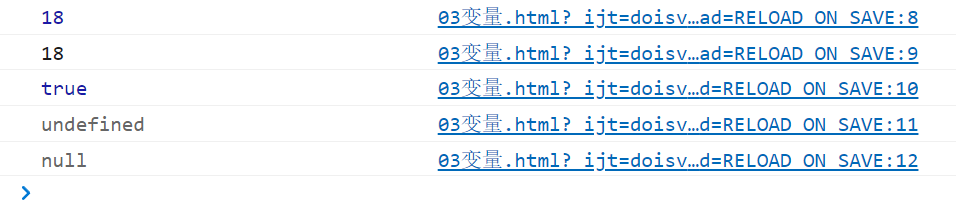
通过浏览器控制台输出的颜色也可以判断出数据类型
1
2
3
4
5
| console.log(18);
console.log('18');
console.log(true);
console.log(undefined);
console.log(null);
|
![image-20220310145020882]()
蓝色的数字为 Number 类型或是 Boolean 类型,黑色的为 String, null 或 undefined
# 数据类型转换
使用表单,prompt 获取过来的数据默认是字符串类型的,此时就不能直接简单的进行加法运算,而需要转换变量的数据类型,通俗的说,就是把一种数据类型的变量转换成另外一种数据类型
# 转换为字符串
| 方式 | 说明 | 案例 |
|---|
| toString() | 转成字符串 | var num = 1; alert(num.toString()); |
| String () 强制转换 | 转成字符串 | var num = 1; alert(String(num)); |
| 加号拼接字符串 | 和字符串拼接的结果都是字符串 | var num = 1; alert (num + ‘我是字符串’); |
1
2
3
| alert(typeof(num.toString()));
alert(typeof(String(num)));
alert(typeof(num+''));
|
- toString () 和 String () 使用方式不一样
- 三种转换方式,第三种更加常用,这一种方式也称之为隐式转换
# 转换为数字型 (重点)
| 方式 | 说明 | 案例 |
|---|
| parseInt (string) 函数 | 将 string 类型转成整数型数值 | parse(‘78’); |
| parseFloat () 函数 | 将 string 类型转成浮点数值 | parseFloat(‘78.93’); |
| js 隐式转换 (- * /) | 利用算术运算符隐式转换为数值 | ‘12’ - 0 |
| Number () 强制转换函数 | 将 string 类型转换数值型 | Number(‘12’) |
1
2
3
4
5
6
7
8
| var num = prompt('请输入任意数字: ');
alert(typeof(parseInt(num)));
alert(parseInt(num));
alert(typeof(parseFloat(num)));
alert(parseFloat(num));
alert(typeof(num * 1));
alert(Number('12'))
alert(typeof(Number('12')));
|
parseInt () 如果参数字符串为小数,那么取整数部分
parseInt () 可以自动去除 string 中的单位 (读取到非数字部分自动截断)
# 转换为布尔型
| 方式 | 说明 | 案例 |
|---|
| Boolean () 函数 | 其他类型转成布尔型 | Boolean(‘true’); |
- 代表空,否定的值会被转换为 false, 如 ‘’, 0, NaN, undefined
1
2
3
4
5
6
7
| console.log(Boolean(''))
console.log(Boolean(0))
console.log(Boolean(NaN))
console.log(Boolean(null))
console.log(undefined)
console.log('小白')
console.log(Boolean(12))
|
# 年龄计算
1
2
| var num = prompt('请输入出生年份 : ');
alert('你今年' + (2022 - num) + '岁啦');
|
# 简单计算器
1
2
3
4
5
6
7
8
9
10
11
12
13
14
15
16
17
18
| var num1 = prompt('请输入数字1 : ');
var num2 = prompt('请输入数字2 : ');
var symbol = prompt('请输入运算符 : ');
if (symbol === '+'){
alert(Number(num1) + Number(num2));
}
else if (symbol === '-') {
alert(Number(num1) - Number(num2));
}
else if (symbol === '*') {
alert(Number(num1) * Number(num2));
}
else if (symbol === '/') {
alert(Number(num1) / Number(num2));
}
|
# 交换变量的值
1
2
3
4
5
6
7
| var a = prompt('请输入变量一的值 : ');
var b = prompt('请输入变量二的值 : ');
var c = b;
b = a;
a = c;
alert('变量一交换之后变为 : ' + a);
alert('变量二交换之后变为 : ' + b);
|
# 一次询问并获取用户的姓名,年龄,性别,并打印输出